Script-to-previz · on your own keys
Script in. Film out.
Upload a screenplay. Approve your cast, places and props once — every frame is drawn from those references, so the same faces, rooms and props carry through the whole film.
3 free films in the beta · you pay the AI providers directly on your own keys
 SC 05Lightning strikes the church — the origin
 SC 06Same character, same face — SI Saajan
 SC 07Same church, months later — the climax
Frames from a test script, each drawn from approved reference sheets
One rail, script to cut
Nothing is drawn until you have approved what it is drawn from. You approve descriptions, then reference sheets — and only then frames and clips.
Script
Upload a screenplay — Fountain, Final Draft (FDX), PDF or plain text. IdeaRail splits it into scenes and reads each one.
Cast & world
A world bible of every person, place and prop in the script. You read and approve each description.
References
Reference sheets are drawn from the approved descriptions. You approve the ones the film will use.
Frames
Every frame is drawn from the approved references it needs. You keep the take you want.
Motion
Clips animate from the frame you kept — not from a fresh guess — with voices for the dialogue.
Export
Take out a storyboard PDF, or a cut of the film as one MP4 at script pacing.
● The problem with every other AI tool
Every frame is drawn from an approved reference
A face, a place or a prop is approved once — a person looks at it and signs off. Every later frame that needs it is drawn from that same reference, instead of being reimagined from scratch. That is the difference between a film and a slideshow of similar-looking strangers.
Location consistency
Same church. Different night. Never redrawn.
The village church is approved once as a location plate. Every scene that returns to it — origin storm or rain-soaked climax — is drawn from that same plate, so the building never drifts.
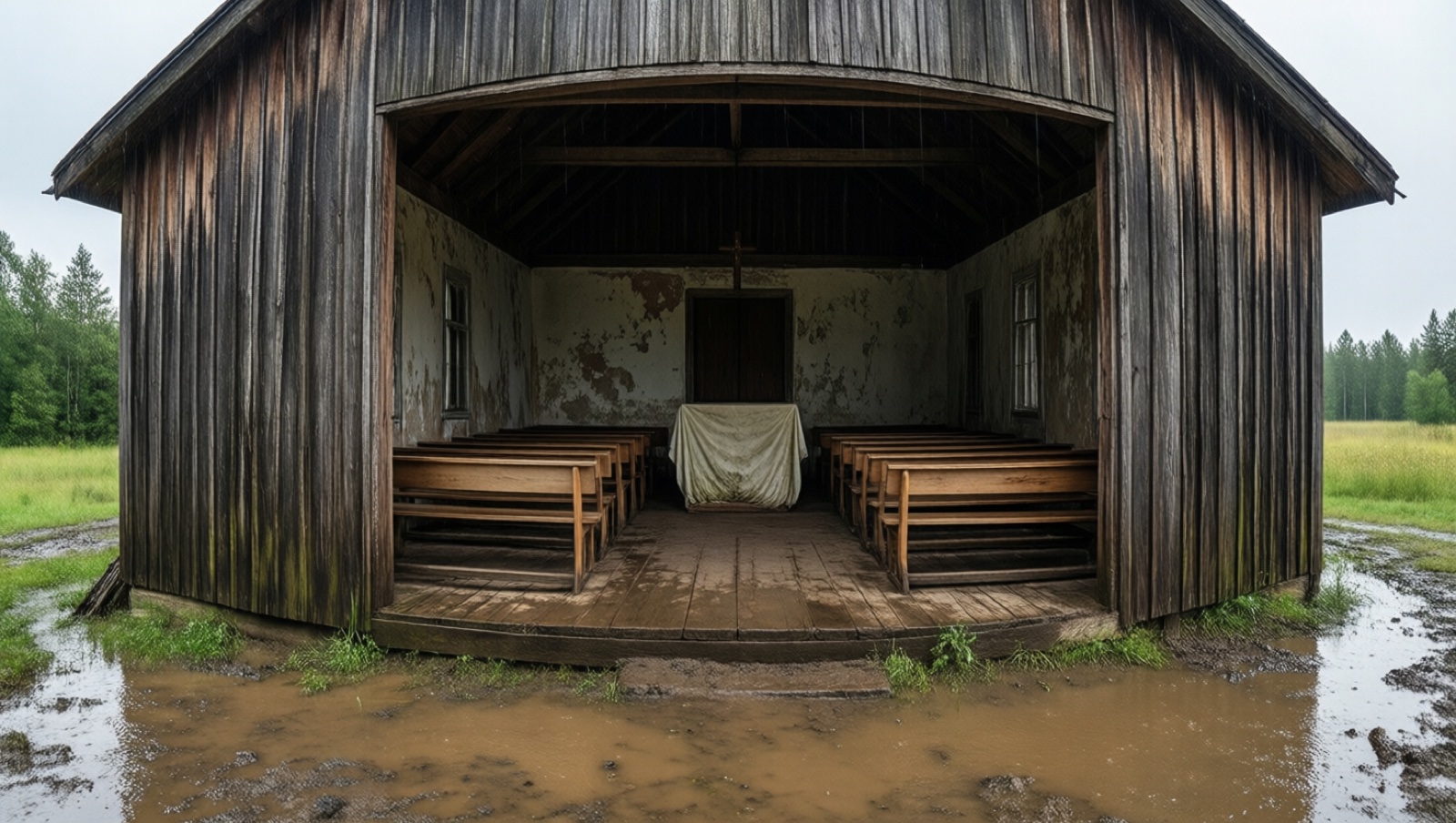 Approved plateDrawn frame
Character consistency
Approved once. Reused everywhere his face appears.
SI Saajan's reference sheet is approved by a person before any scene is drawn. Every later shot of him — different scene, different angle — is drawn from that one approved sheet.
 Approved referenceDrawn frame
● Live · viewfinder
You see every take before it counts
Every take is checked
Each take is checked against the film before it reaches you — is it the right place, the right costume, does it hold continuity with the shots around it.
Nothing silently redrawn
If an engine refuses a frame, the refusal stands and you see why. IdeaRail never quietly redraws it on another engine — you choose what happens next.
Every take keeps its record
What was sent, which references, which engine and model drew it. Look at any frame and see exactly how it was made.
Voices in Indian languages
Give characters voices in Indian languages with your own Sarvam key — alongside clips that speak their lines on engines that support dialogue.
Bring your own keys
Your keys. Your engines. Your bill.
IdeaRail draws on your own AI provider keys, so you pay the providers directly at their rates. Choose the engines for each film, and change them for any single draw.
- Added in Settings → Keys, encrypted, and never shown again in full
- Never available to agents, never sent over MCP
- One Google AI Studio key is enough to read, draw and animate a film
Your Google AI Studio key
Gemini reads the script · Nano Banana 2 / Pro stills · Veo 3.1 clips
Your BytePlus key
Seedream stills · Seedance clips with dialogue
Your MiniMax key
Hailuo clips
Your Sarvam key
Voices in Indian languages
Your fal.ai · Replicate key
Any image or video model, through a model card
IdeaRail works with your own keys for these providers. It is not affiliated with or endorsed by any of them.
Your own agent
Let your agent drive. You stay the director.
IdeaRail is an MCP server. Claude Desktop, Cursor or any MCP client can open a film, read it scene by scene, write descriptions and queue draws. With a draw ticket, your agent can even draw a take with its own tools and hand it back to be checked like any other.
- A person approves and picks every picture, on the wall
- Agents never see your provider keys
- Agents never buy a film and never approve a take
you › Open my film and tell me what's blocking scene 4.
agent › Scene 4 needs the café's reference approved. I've drawn two options — they're on your wall.
you › Draw the rest of the scene once I've picked one.
● Pricing
Pay once per film
Your first 3 films are free in the beta. After that, unlock a film once, priced by its size. The AI itself runs on your own keys, so the providers bill you directly.
Short
25 shots or fewer
Pricing announced at launch
One-time unlock · plus your own provider usage
Medium
100 shots or fewer
Pricing announced at launch
One-time unlock · plus your own provider usage
Feature
400 shots or fewer
Pricing announced at launch
One-time unlock · plus your own provider usage
Bigger than 400 shots? Get in touch.
The studio
We don't just make boards. We make films.
Beyond the app, our studio takes projects all the way to finished animation and music videos. AI does the mechanical heavy lifting — concept art, coverage, background plates. People keep the story, the performances and the taste.
- Concept art & previsualisation from your shot list
- Blender hero animation + AI-generated environments
- Edit, sound and grade to a finished cut
Hexa on the Mind
CodeNear NextGen Studios
Questions
What do I need to start?+
A filmmakers.studio account and one Google AI Studio key. That one key reads the script with Gemini, draws stills with Nano Banana and animates clips with Veo. Other providers are optional.
Which script formats can I upload?+
Fountain, Final Draft (FDX), PDF and plain text. A scanned PDF needs OCR first, because there is no text to read.
Who pays for the AI?+
You do, directly. Every draw runs on your own provider keys, so the providers bill you at their own rates. IdeaRail charges for the film, not for the AI usage.
What happens to my keys?+
You add them in Settings → Keys. They are encrypted, never shown again in full (only the last four characters), and never available to agents or over MCP.
How does it keep faces, rooms and props the same?+
Nothing is drawn until you approve the description, then the reference sheet. Every frame is drawn from the approved references it needs, and clips animate from the frame you kept.
Can I use my own AI agent?+
Yes. IdeaRail is an MCP server, so Claude Desktop, Cursor and other MCP clients can read a film, queue draws, and even draw takes with their own tools using draw tickets. A person still approves and picks every picture on the wall. Agents never see your keys, and can never buy or approve.
Can I choose which engine draws what?+
Yes — engines are chosen per film, and you can override them for a single draw. If an engine refuses a frame, it isn't silently redrawn elsewhere.
Which account do I sign in with?+
Your filmmakers.studio account — the same sign-in works across its apps. IdeaRail never sees your password.
Put your script on the rail.
IdeaRail is in a private beta. Tell us about your project and we'll get you in.
Request beta access